Cisco Secure ACS can be used in several scenarios. Here are few examples that I tested in a quick lab in a thursday afternoon.
Case 1 - IEEE802.1x for LAN
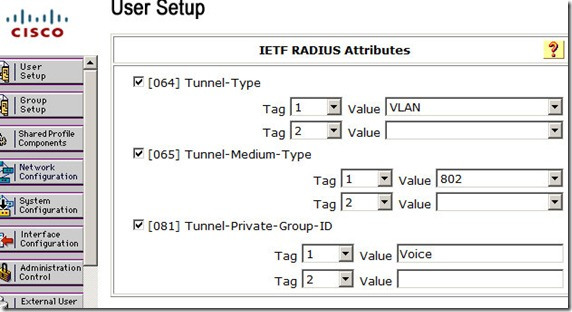
One of advantages of LAN authentication is Dynamic VLAN assignment. ACS can authenticate users and put them on their appropriate VLAN, based on their account setting. In the following example IOS Catalyst switch and CS-ACS are configured for 802.1x authentication of wired users. Don't forget to configure user ports as access port, the dot1x commands would not appear otherwise!
Switch(config-if)# switchport mode access
aaa new-model
aaa authentication login NONE none
aaa authentication dot1x default group radius
aaa authorization network default group radius
! --- dot1x uses "default" method for authentication (Not Optional)
radius-server host 192.168.218.1 auth-port 1645 acct-port 1646 key CISCO
dot1x system-auth-control
!
interface FastEthernet0/2
switchport mode access
dot1x port-control auto
spanning-tree portfast
On the ACS, enable option 64,65 and 81 under user properties to allocate a VLAN to each user:
Case 2 - ASA Auth Proxy
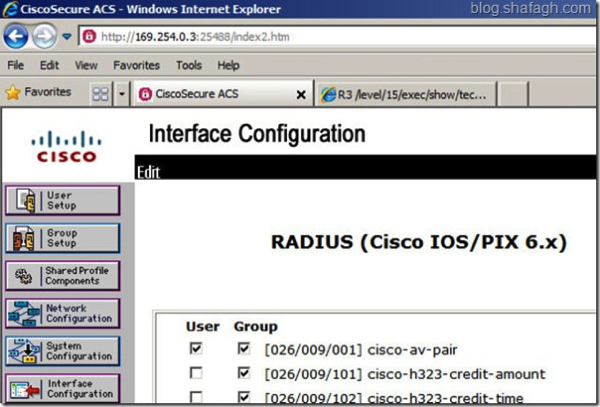
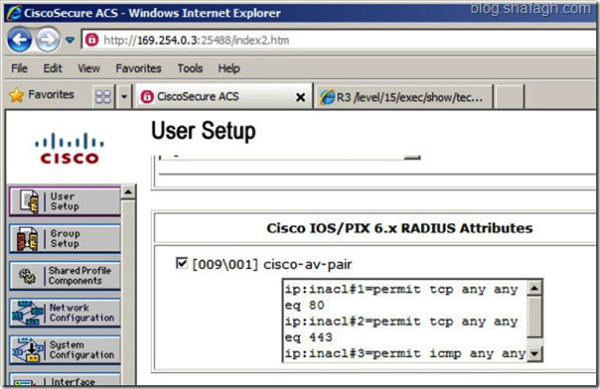
ASA software has a Cut-Through Proxy or “AAA for network Access” feature to authenticate users first via a protocol such as HTTP/HTTPS, FTP or Telnet prior any packet delivery through ASA. Cut-Through can be implemented by either RADIUS or TACACS+. RADIUS supports per user ACL while TACACS supports ACL by command authorization!
Cut-Through with RADIUS
User is required to get authenticate first. Then based on user account only HTTP and HTTPS traffic will be allowed (per user ACL)
User is required to get authenticate first. Then based on user account only HTTP and HTTPS traffic will be allowed (per user ACL)
aaa authentication telnet console MYAAA
aaa authentication match TRIGGER inside MYAAA
aaa-server MYAAA protocol radius
aaa-server MYAAA host 169.254.0.3 key CISCO
!
access-list TRIGGER extended permit ip any any
access-group OutsideIN in interface outside
Cut-Through with TACACS+
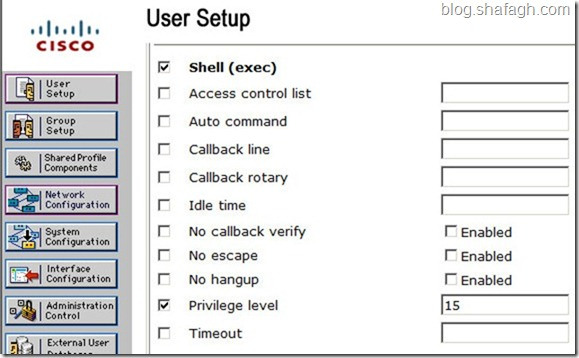
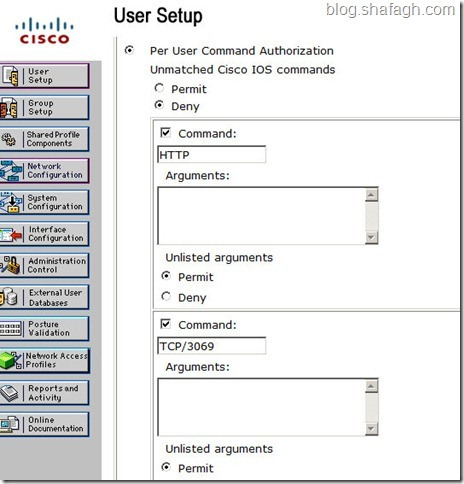
In this example user is required to authenticate in order to be able to request HTTP or send TCP/3069 packets to any destination:
aaa-server AAA protocol tacacs+
aaa-server AAA host 169.254.0.3 key CISCO
aaa authentication match Cut-Through inside AAA
aaa authorization match Cut-Through inside AAA
!
access-list InsideIN extended permit icmp any any
access-list Cut-Through extended permit tcp any any eq www
access-list Cut-Through extended permit tcp any any eq 3069
FW1# show uauth
Current Most Seen
Authenticated Users 1 1
Authen In Progress 0 1
user 'CISCO' at 169.254.0.1, authorized to: (idle for 0:00:21)
port 169.254.2.2/http 169.254.2.2/tcp/3069
absolute timeout: 0:05:00
inactivity timeout: 0:00:00
Case 3 - IOS Auth Proxy
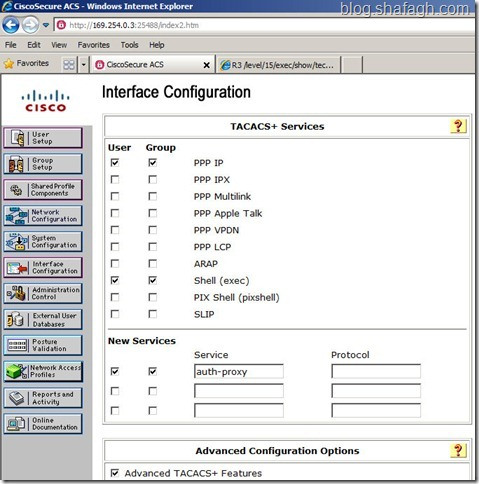
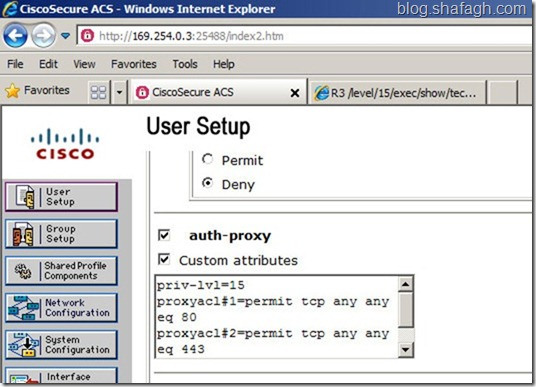
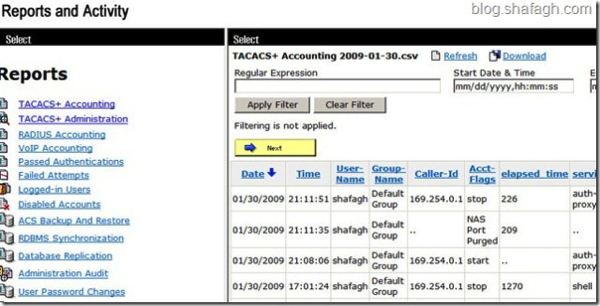
Authentication Proxy is the same feature but implemented on IOS. Users are required to authenticate before their traffic can pass through IOS secure router. Cisco Secure ACS or a RADIUS/TACACS server can authorize user and assign an access-list to permit traffic to transit. Auth-proxy also provides accounting for auditing and billing purposes.
IOS Configuration
IOS Configuration
aaa new-model
aaa authentication login default group tacacs+
aaa authorization auth-proxy default group tacacs+
aaa accounting auth-proxy default start-stop group tacacs+
aaa session-id common
!
ip tacacs source-interface Loopback0
tacacs-server host 169.254.0.3 key CISCO
!
ip auth-proxy auth-proxy-banner http ^C
Welcome to X-Network
Please Login
^C
ip auth-proxy name AUTHPROXY http inactivity-time 60 list AUTHTRIGGER
ip admission auth-proxy-banner http ^C
Successful Login Thanks ^C
!
interface Loopback0
ip address 150.1.1.1 255.255.255.255
!
interface Ethernet0/0
ip address 169.254.0.2 255.255.0.0
ip auth-proxy AUTHPROXY
!
interface Ethernet0/1
ip address 10.0.0.1 255.255.255.0
ip access-group AUTHACL out
!
ip http server
ip http authentication aaa
!
ip access-list extended AUTHACL
deny ip any host 10.0.0.2
permit ip any any
ip access-list extended AUTHTRIGGER
permit tcp any any eq www 443
Configuration on ACS
(shafagh.com)

No comments:
Post a Comment